Policy
Define your own reminder rules — rotation, expiry, reuse, naming, tagging — then see and bulk-fix the secrets that violate them.
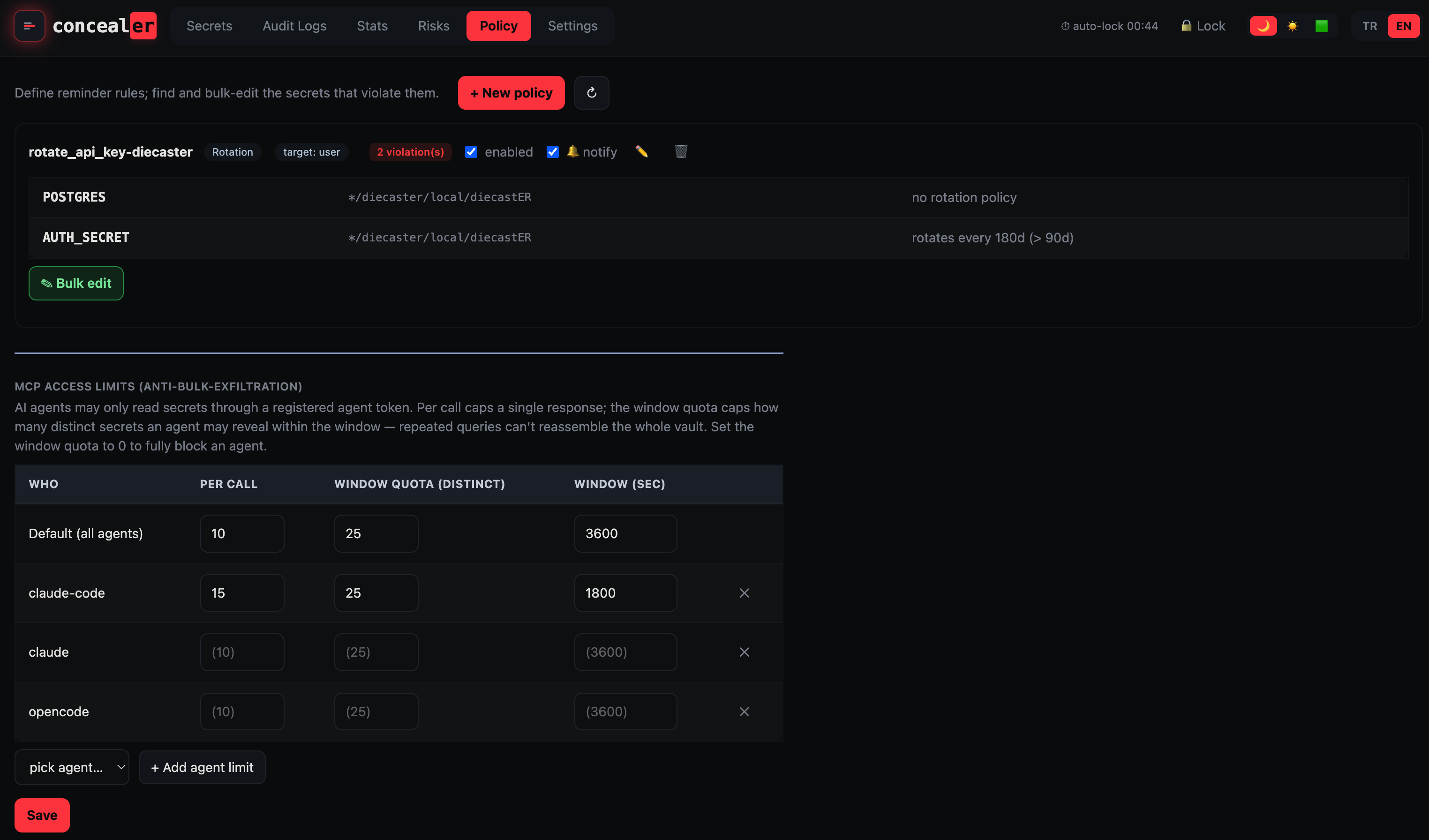
Rules
Add, edit, delete, and toggle rules on the Policy tab (GET/POST /api/policies, DELETE /api/policies/<id>). Each rule lists the secrets that violate it — click a row to open that secret’s editor, or Bulk edit all violators at once (add tags / set a rotation interval / set a collection).
Rule kinds:
| Kind | Flags a secret when… |
|---|---|
| Rotation | it has no rotation policy, is overdue, or its interval exceeds a max you set |
| Expiry | it is expired, expiring within N days, or missing an expiry field |
| Reuse | its value is shared with another record |
| Naming | its name doesn’t match a regex you provide |
| Tagging | it is missing tags you require |
Audience
Each rule carries a target (user / agent / cli / web / tui / mcp / all) so different rules can apply to different consumers of the vault.
Notifications
Enable the 🔔 bell on a rule to get notified of its violations: notify-enabled violations surface as a badge on the Policy tab and — with browser permission — a browser notification on unlock.
From the CLI
concealer policy list      # show configured rules
concealer policy check     # exits non-zero if any rule is violated (cron-friendly)
MCP access limits (anti-bulk-exfiltration)
The built-in agent-access policy lives at the bottom of the Policy page (it moved here from Settings). AI agents may only read secrets through a registered agent token; two per-agent limits stop an agent from reassembling the whole vault with repeated queries:
- Per call — caps how many rows a single response may return.
- Window quota (distinct) — caps how many distinct secret names an agent may reveal within the rolling window (already-disclosed names re-list free; set the quota to 0 to fully block an agent).
- Window (sec) — the length of the rolling window.
Set a default for all agents plus per-agent overrides. See MCP for AI Agents for how the gate works end-to-end.
The Policy page is the human owner’s interface (unlocked by the master password) and is not itself subject to the agent rate limits it configures.